Carnage

Room Link: Carnage
Overview
- Plattform:
- TryHackMe
- Room:
- Carnage
- Category:
- Forensics
- Difficulty:
- Medium
Introduction
Carnage is a challenge focused on network forensics and malware traffic analysis. Eric Fischer from the Purchasing Department received an email from a known contact containing a Word document. After opening the document and clicking “Enable Content,” his workstation began making suspicious outbound connections. The SOC detected the activity, captured the network traffic and provided the PCAP file for analysis.
The goal is to investigate the packet capture (PCAP file) and uncover the malicious activities.
Note: Do not directly interact with any domains or IP addresses mentioned in this writeup, as they may be associated with malicious activity.
Challenge Objectives
The objective of this room is to answer the following 20 questions:
- What was the date and time for the first HTTP connection to the malicious IP? (answer format: yyyy-mm-dd hh:mm:ss)
- What is the name of the zip file that was downloaded?
- What was the domain hosting the malicious zip file?
- Without downloading the file, what is the name of the file in the zip file?
- What is the name of the webserver of the malicious IP from which the zip file was downloaded?
- What is the version of the webserver from the previous question?
- Malicious files were downloaded to the victim host from multiple domains. What were the three domains involved with this activity?
- Which certificate authority issued the SSL certificate to the first domain from the previous question?
- What are the two IP addresses of the Cobalt Strike servers? Use VirusTotal (the Community tab) to confirm if IPs are identified as Cobalt Strike C2 servers. (answer format: enter the IP addresses in sequential order)
- What is the Host header for the first Cobalt Strike IP address from the previous question?
- What is the domain name for the first IP address of the Cobalt Strike server? You may use VirusTotal to confirm if it's the Cobalt Strike server (check the Community tab).
- What is the domain name of the second Cobalt Strike server IP? You may use VirusTotal to confirm if it's the Cobalt Strike server (check the Community tab).
- What is the domain name of the post-infection traffic?
- What are the first eleven characters that the victim host sends out to the malicious domain involved in the post-infection traffic?
- What was the length for the first packet sent out to the C2 server?
- What was the Server header for the malicious domain from the previous question?
- The malware used an API to check for the IP address of the victim's machine. What was the date and time when the DNS query for the IP check domain occurred? (answer format: yyyy-mm-dd hh:mm:ss UTC)
- What was the domain in the DNS query from the previous question?
- Looks like there was some malicious spam (malspam) activity going on. What was the first MAIL FROM address observed in the traffic?
- How many packets were observed for the SMTP traffic?
My Approach
Throughout the challenge, Wireshark tool is used to analyze the provided PCAP file.
1. What was the date and time for the first HTTP connection to the malicious IP? (answer format: yyyy-mm-dd hh:mm:ss)
We filter the packets using tcp.port == 80, select the first packet, and check the Arrival Time (UTC) under the Frame section.
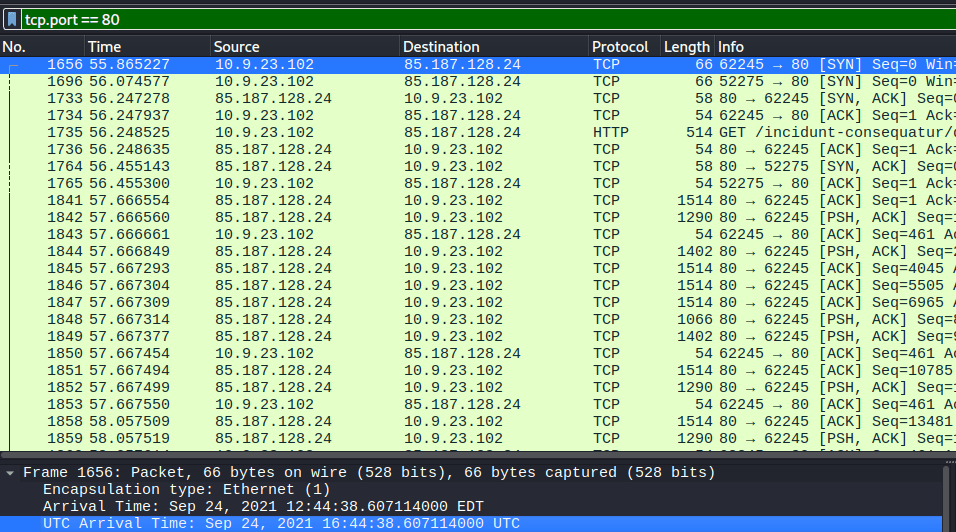
2. What is the name of the zip file that was downloaded?
The source IP 10.9.23.102 attempts to establish a TCP connection
with the destination IP 85.187.128.24
using the standard three-way handshake.
After the connection is established, the client sends an HTTP GET request:
GET /incidunt-consequatur/documents.zip.
By following the HTTP stream (right-click the HTTP GET packet -> Follow -> HTTP Stream),
we can see that the server responds with HTTP/1.1 200 OK and provides the file as a binary
attachment named documents.zip.
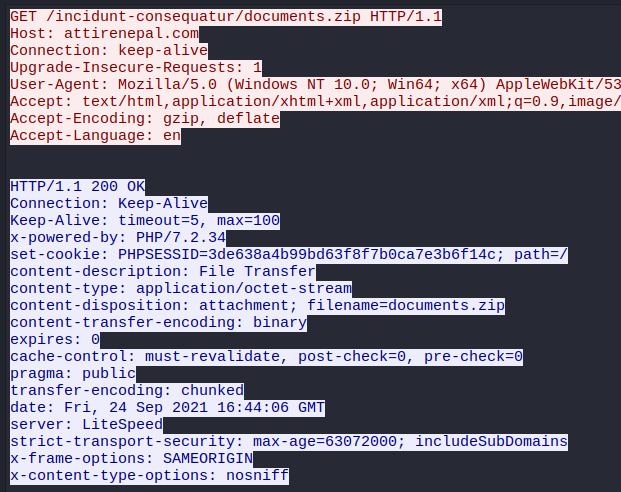
3. What was the domain hosting the malicious zip file?
As in the previous question, we can find this information in the HTTP stream.
The victim requests /incidunt-consequatur/documents.zip
from the host attirenepal.com.

4. Without downloading the file, what is the name of the file in the zip file?
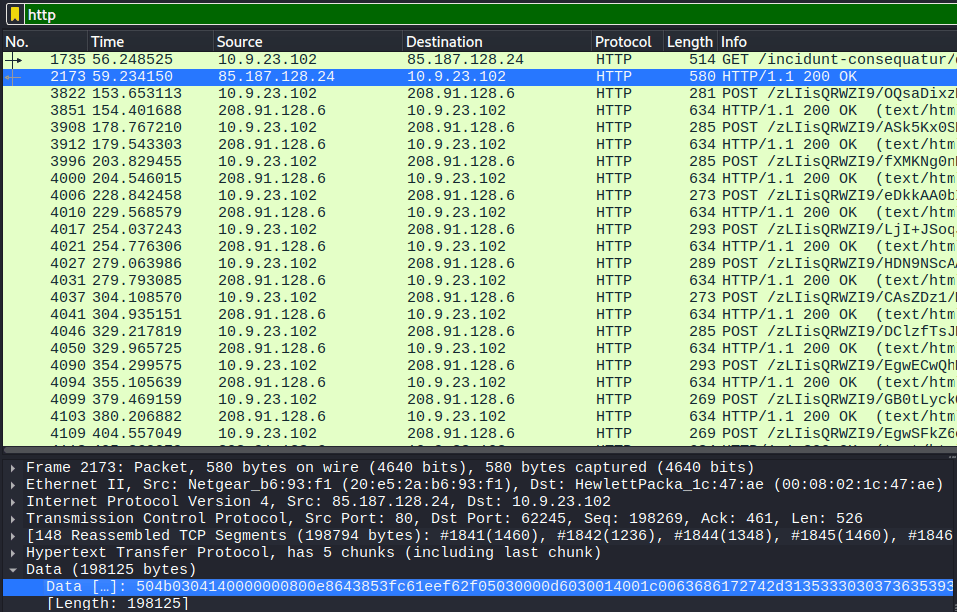
We can inspect the ZIP data directly in Wireshark.
We will inspect the HTTP/1.1 200 OK under the Data section:
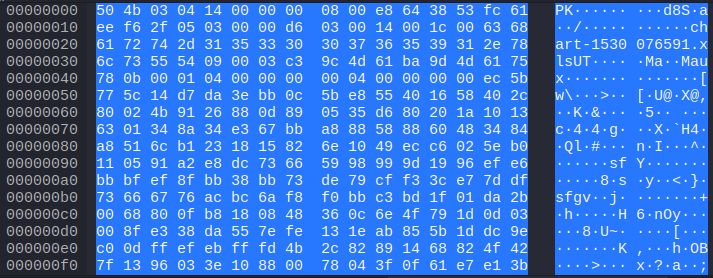
ZIP files have a defined binary structure and use specific signatures, often referred to as magic bytes, to identify different records within the archive. A ZIP file contains several types of headers. For this analysis, we will focus on the Local File Header:
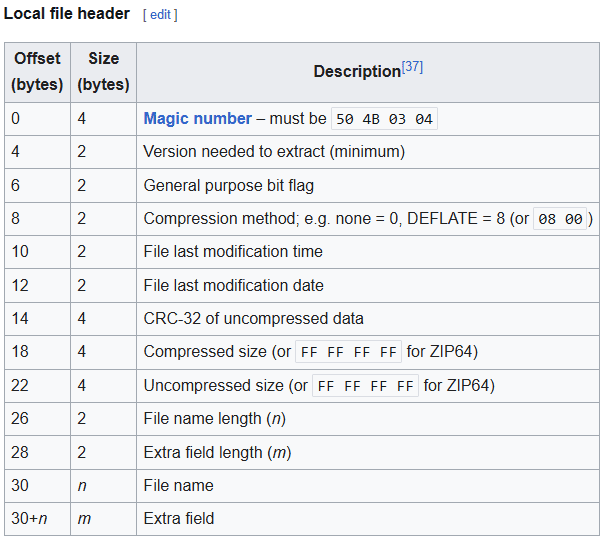
The Local File Header contains metadata about a file stored inside the ZIP archive. It begins with the signature
50 4B 03 04, which indicates the start of a Local File Header.
For our analysis, the most relevant fields are the signature, file name length, and file name.
Using this structure, we can map these fields to the bytes observed in our packet:
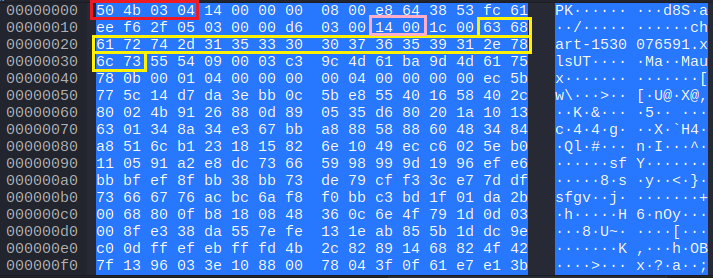
The bytes highlighted in red represent the Local File Header signature.
The bytes highlighted in pink represent the file name length: 14 00.
ZIP stores this multi-byte value in
little-endian
byte order, meaning that the least significant byte is stored first.
Therefore, 14 00 represents the hexadecimal value
0x0014,
which equals 20 in decimal. This tells us that the file name is 20 bytes long.
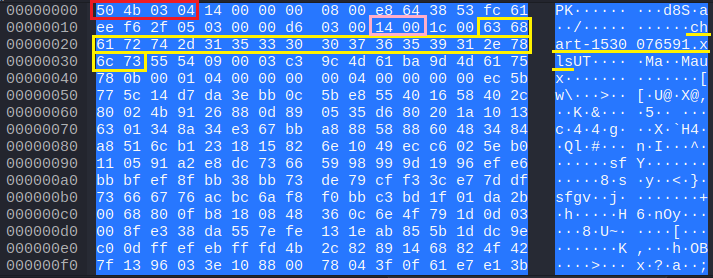
The file name begins at offset 30. From there, we read the next 20 bytes, highlighted in yellow:
63 68 61 72 74 2d 31 35 33 30 30 37 36 35 39 31 2e 78 6c 73.
Converting these hexadecimal byte values to ASCII gives us the file name.
5. What is the version of the webserver from the previous question?
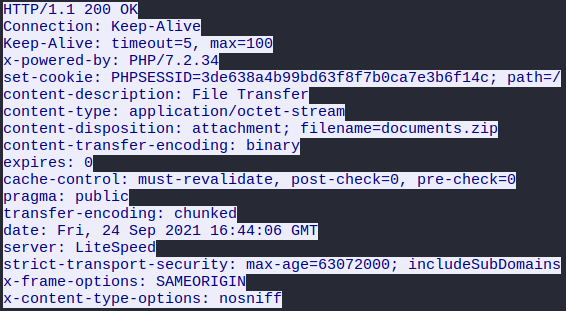
By inspecting the HTTP stream, we can identify the name of the web server:
6. What is the name of the webserver of the malicious IP from which the zip file was downloaded?
As in the previous question, we can identify the web server version by inspecting the HTTP stream:
7. Malicious files were downloaded to the victim host from multiple domains. What were the three domains involved with this activity?
As a hint, the challenge suggests checking the HTTPS traffic and narrowing the timeframe from 16:45:11 to 16:45:30.
To filter correct the time we should check our time settings in Wireshark and change the settings to UTC-format. In Wireshark: View -> Time Display Format -> UTC Date and Time of Day (1970-01-01 01:02:03.123456Z):
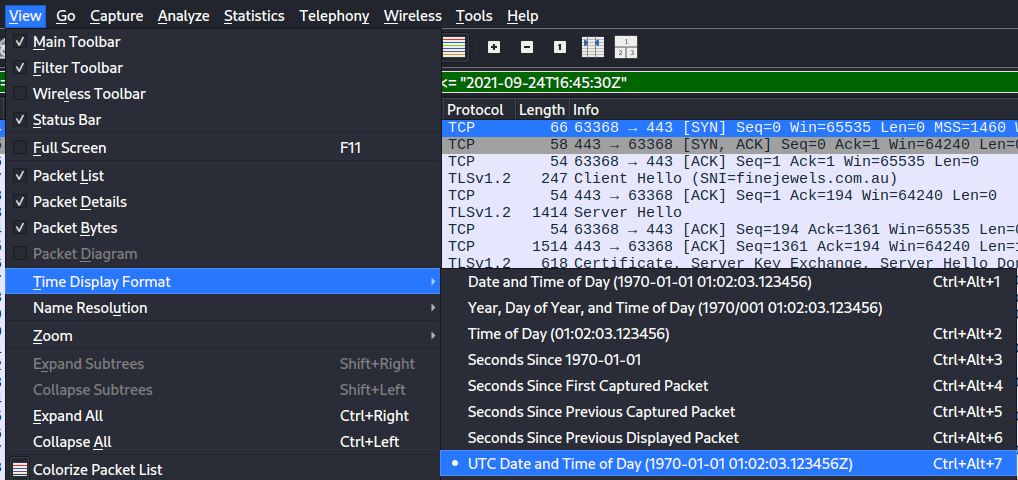
Now we can filter for HTTPS traffic within the specified timeframe:
tcp.port == 443 && frame.time <= "2021-09-24T16:45:30Z" && frame.time >= "2021-09-24T16:45:11Z"

Since the HTTPS payload is encrypted, we cannot directly reveal the downloaded files. However, the TLS Client Hello packets expose the Server Name Indication (SNI), which allows us to identify the domains contacted by the victim during this timeframe.

After excluding legitimate Microsoft traffic, three suspicious domains remain:
finejewels.com.au, thietbiagt.com, new.americold.com
8. Which certificate authority issued the SSL certificate to the first domain from the previous question?
To identify the certificate authority, we inspect the TLS handshake for finejewels.com.au
with the following filter: tls.handshake.extensions_server_name == "finejewels.com.au"

By following the TCP stream we find that the certificate was issued by GoDaddy:

9. What are the two IP addresses of the Cobalt Strike servers? Use VirusTotal (the Community tab) to confirm if IPs are identified as Cobalt Strike C2 servers. (answer format: enter the IP addresses in sequential order)
This task was especially difficult for me since I was unfamiliar with Cobalt Strike and had never used packet analysis to detect a C2 server before.
However, the challenge provides a hint suggesting that we inspect the Conversations option in Wireshark.
If we follow the hint, we get a large list of IP addresses. There are 447 entries. We could check each IP individually on https://www.virustotal.com/ and eventually solve the task but this would be inefficient approach.
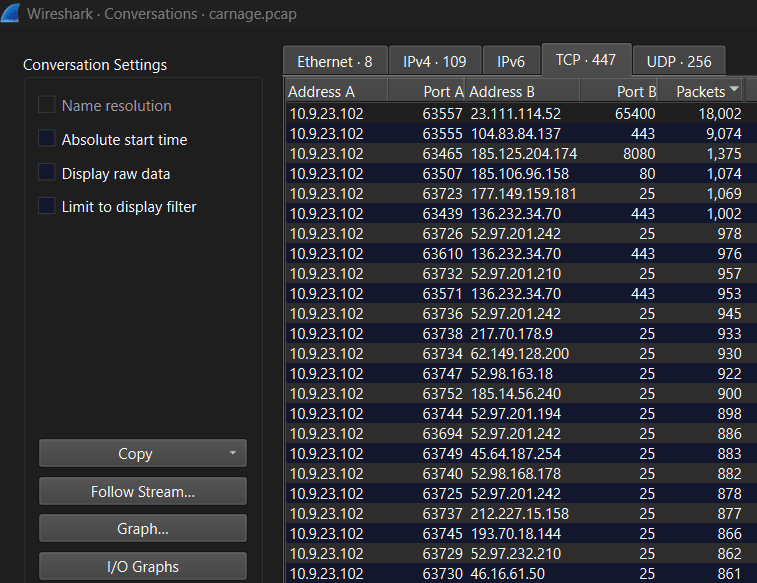
My next step was to sort the TCP conversations by packet count. A high packet count does not prove Cobalt Strike activity but it can help us prioritize conversations that are worth investigating further. Next, we can deprioritize connections on port 25, as they are typically associated with SMTP traffic and are more likely related to the malspam activity observed in the capture. Based on this, we have significantly narrowed down the list of potential IP addresses and can focus on the following five IPs:
- 23.111.114.52
- 104.83.84.137
- 185.125.204.174
- 185.106.96.158
- 136.232.34.70
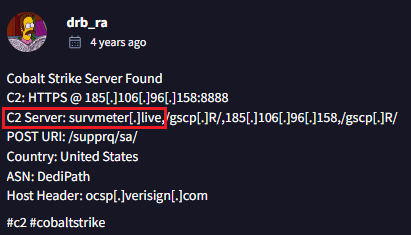
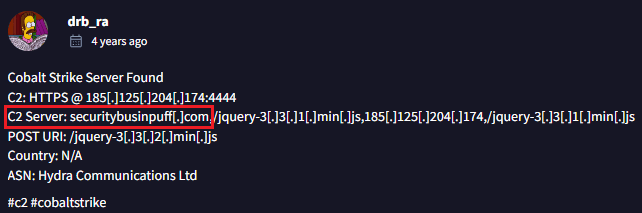
Bingo! Two of these five IP addresses are indeed flagged as Cobalt Strike C2 servers in the VirusTotal Community tab:
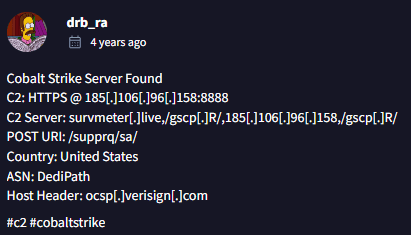
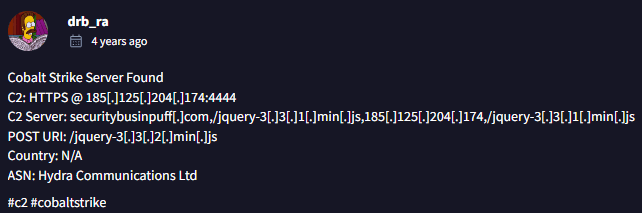
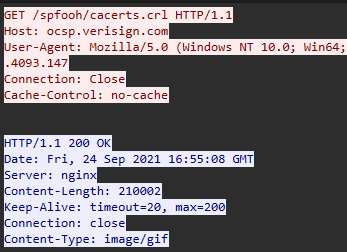
10. What is the Host header for the first Cobalt Strike IP address from the previous question?
By filtering for ip.dst == 185.106.96.158 && http
and following the HTTP stream for GET /spfooh/cacerts/crl, we can identify the Host header.
The interesting part is that the server responds with an image/gif.
11. What is the domain name for the first IP address of the Cobalt Strike server? You may use VirusTotal to confirm if it's the Cobalt Strike server (check the Community tab).
12. What is the domain name of the second Cobalt Strike server IP? You may use VirusTotal to confirm if it's the Cobalt Strike server (check the Community tab).
13. What is the domain name of the post-infection traffic?
The challenge provides a hint suggesting that we filter for HTTP POST traffic.
We filter for HTTP POST requests from the victim host:
ip.src == 10.9.23.102 && http.request.method == "POST"
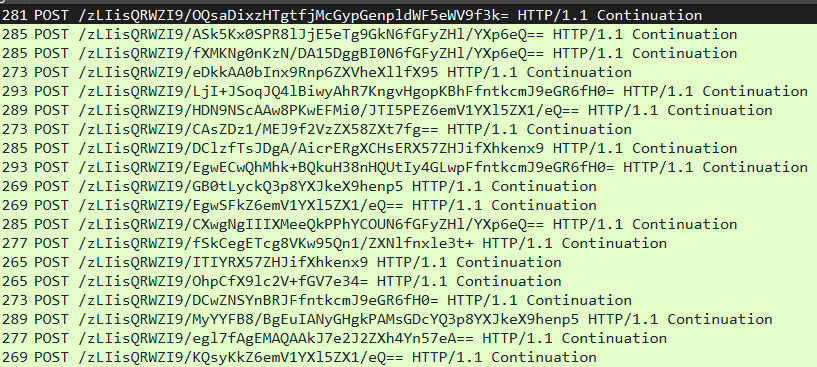
This reveals a series of POST requests to
208.91.128.6
with unusual looking request paths and encoded request bodies.
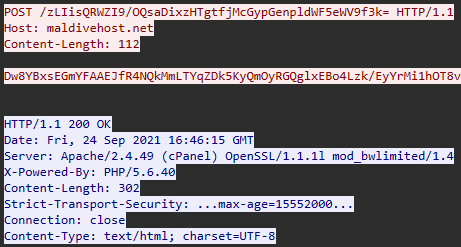
By following one of these HTTP streams, we can inspect the request headers and find the domain name:

14. What are the first eleven characters that the victim host sends out to the malicious domain involved in the post-infection traffic?

15. What was the length for the first packet sent out to the C2 server?
The question refers to the C2 server involved in the post-infection traffic from the previous questions,
rather than the two Cobalt Strike IP addresses identified earlier.
Using the same POST-request filter: ip.src == 10.9.23.102 && http.request.method == "POST"
we inspect the first request sent to maldivehost.net and check the packet length in Wireshark's "Length" column.
16. What was the Server header for the malicious domain from the previous question?
By following the HTTP stream for the same packet used in question 15, we can inspect the server response and identify the web server information in the Server header.
17. The malware used an API to check for the IP address of the victim's machine. What was the date and time when the DNS query for the IP check domain occurred? (answer format: yyyy-mm-dd hh:mm:ss UTC)
My first attempt was to simply filter the traffic for dns.
Since this returned too many results, I had to come up with a more specific filter.
After researching the Wireshark documentation, specifically
Building Display Filter Expressions,
I found that dns.qry.name can be used to filter for queried domain names.
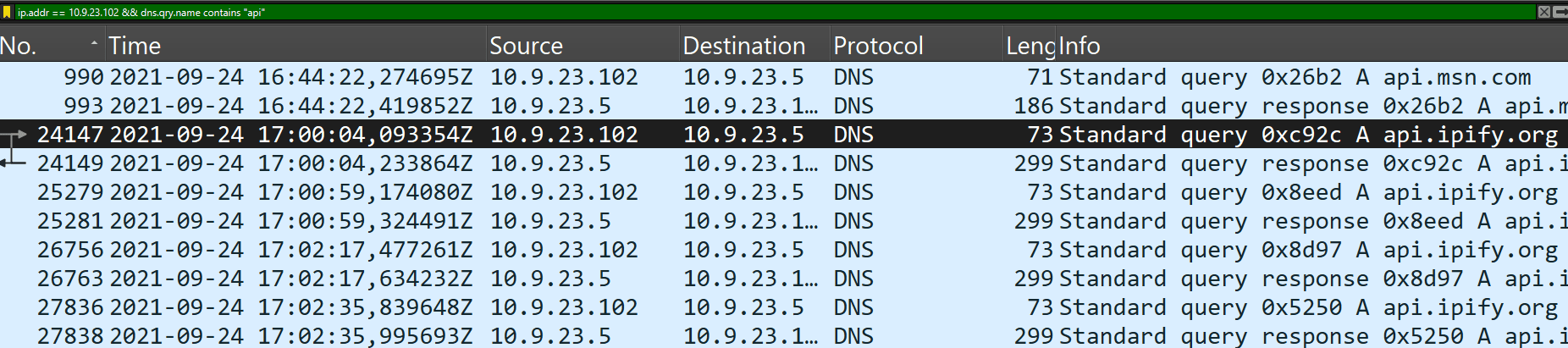
I then used the filter ip.addr == 10.9.23.102 && dns.qry.name contains "api"
to reduce the number and get more relevant results.
This reveals several queries, including api.ipify.org,
which is a public IP lookup service that returns the external IP address of the requesting host.
18. What was the domain in the DNS query from the previous question?
api.ipify.org
19. Looks like there was some malicious spam (malspam) activity going on. What was the first MAIL FROM address observed in the traffic?
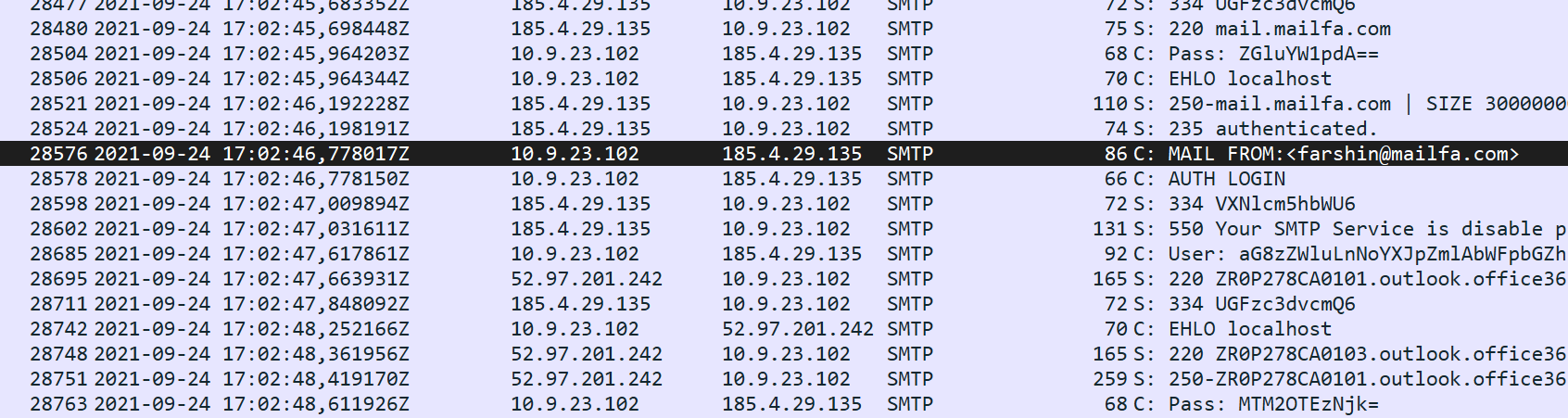
The MAIL FROM command is part of the SMTP protocol, which is used for sending and relaying emails.
Therefore, we can filter for smtp traffic in Wireshark.
We can then scroll through the SMTP traffic until we find the first MAIL FROM entry in the "Info" column.
20. How many packets were observed for the SMTP traffic?
This final question is straightforward.
We can filter the traffic in Wireshark using smtp and find the number of matching packets
in the bottom right corner under Displayed:.
Conclusion
The Carnage challenge was a great introduction to network forensics and malware traffic analysis. By analyzing the provided PCAP file in Wireshark, we were able to reconstruct different stages of the malicious activity and identify suspicious traffic.
One of the most interesting parts for me was analyzing the ZIP file structure directly from the captured network traffic and identifying the file inside the archive without extracting it.
Overall, this challenge helped me better understand how much information can be obtained from a packet capture and how different network protocols can be used to reconstruct malicious activity.